Coloured Orders
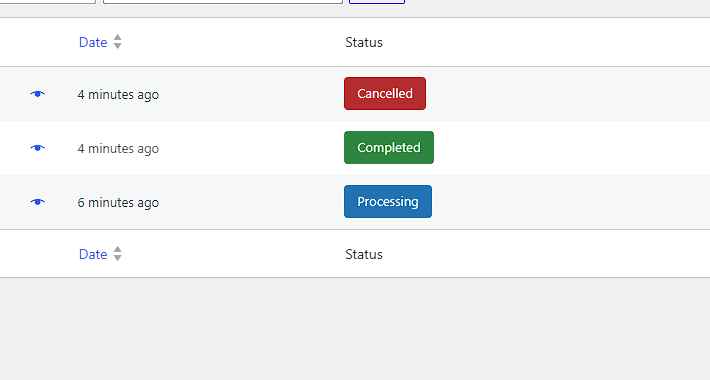
Different order statuses stand out immediately in the WooCommerce Orders list.

Make WooCommerce orders easier to scan by giving each order status its own configurable colour in WordPress admin.
Choose a colour for every registered WooCommerce order status and make busy order lists easier to understand at a glance.
Set a separate colour for every WooCommerce order status.
Manage all status colours from WooCommerce → Status Colours.
Automatically detects custom statuses registered with WooCommerce.
Automatically selects black or white text for clear badge contrast.
Changes the WordPress admin order list without altering customer-facing order data.
Designed for the current WooCommerce Orders screen and declares HPOS compatibility.
Status: Live - WordPress.org Review Pending
The WordPress.org submission is currently under review. The same plugin can be downloaded directly from Arthena while that review is pending.
The Arthena WooCommerce demo site uses a restricted account so you can view real demo orders and the Status Colours settings without being able to alter the store.
Username: productdemo
Password: Demotest
After login, open WooCommerce → Orders or WooCommerce → Status Colours.
Open Live Demo
Different order statuses stand out immediately in the WooCommerce Orders list.
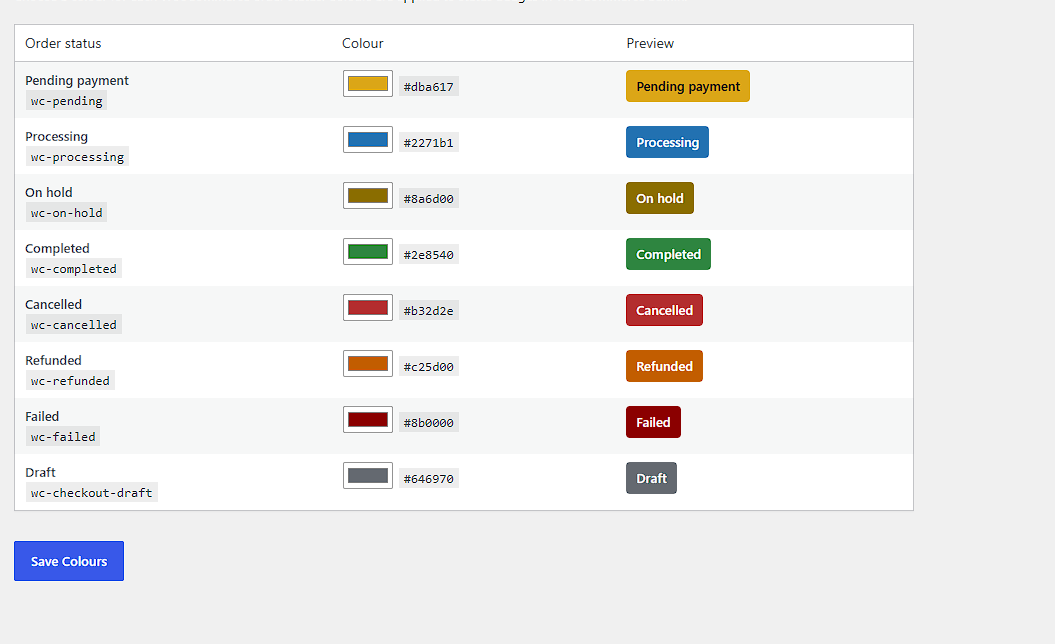
Choose colours, review badge previews and save everything from one straightforward page.
Download the free plugin ZIP from Arthena or WordPress.org once approved.
Open Plugins → Add Plugin → Upload Plugin and select the ZIP.
Activate Arthena Order Status Colours for WooCommerce.
Open WooCommerce → Status Colours, set your colours and save.
Download Arthena Order Status Colours free and give every order status a clear visual identity in WordPress admin.